Zero Trust Security Explained: Principles, Pillars, First Steps
Zero trust means no user, device or network is trusted by default. Here is what NIST and CISA say it takes, the five pillars, and where a company can start.
Key Takeaways
- NIST SP 800-207, published in August 2020, defines zero trust as granting no implicit trust to user accounts or assets based solely on their physical or network location or on who owns them.
- CISA’s Zero Trust Maturity Model 2.0, from April 2023, splits the work into five pillars (Identity, Devices, Networks, Applications and Workloads, and Data) and a maturity path from a Traditional starting point through Initial and Advanced to Optimal.
- NIST’s migration steps start with an inventory of users, devices and business processes, then a low-risk pilot run in reporting-only mode before policies are tightened.
In this article
Zero trust is a security model in which no user, device or network location is trusted by default. Every request to reach an app or a file is checked before access is granted, and access is limited to what that task needs. NIST defined the approach in Special Publication 800-207, Zero Trust Architecture, in August 2020. CISA’s Zero Trust Maturity Model, Version 2.0 (April 2023), turns it into five pillars and a maturity path, from Traditional to Optimal, that an organization can measure itself against.
For a business, that means being on the office network or the VPN is no longer enough to reach anything sensitive.
What problem does zero trust solve?
Traditional security drew a perimeter, usually a firewall plus a VPN, and treated everything inside it as trusted. NIST calls that inside area an “implicit trust zone.” Once attackers breach that perimeter, NIST notes, “further lateral movement is unhindered.”
Zero trust “assumes there is no implicit trust granted to assets or user accounts based solely on their physical or network location” or on whether the company owns the device, according to NIST. The agency describes it as a response to remote work, bring-your-own-device (BYOD) policies and cloud services that sit outside any company-owned network. The focus moves from protecting network segments to protecting resources: data, apps, services and accounts.
The seven tenets in plain English
NIST lists seven basic tenets:
- Everything is a resource, including SaaS apps and, if the company chooses, personal devices.
- Network location alone does not imply trust. All communication is secured, and a request from the office network must meet the same security requirements as one from any other network.
- Access is per session and least privilege. Users get only the access the task needs, and signing in to one resource does not open another.
- Policy is dynamic, weighing who is asking, which app, device state, and possibly behavior and environment.
- No device is inherently trusted. The organization monitors the security posture of its devices and can limit or block those that are unpatched or unmanaged.
- Authentication and authorization are dynamic and strictly enforced before access is allowed. NIST expects identity and access management, including multifactor authentication (MFA), with possible re-checks during a session.
- Data drives improvement: information on assets, traffic and access requests is used to refine policy.
Behind the tenets is a control loop: a policy engine decides whether to grant, deny or revoke access, a policy administrator carries out the decision, and a policy enforcement point, such as a laptop agent or a gateway in front of an app, opens, monitors and closes the connection.
The five pillars and the maturity stages
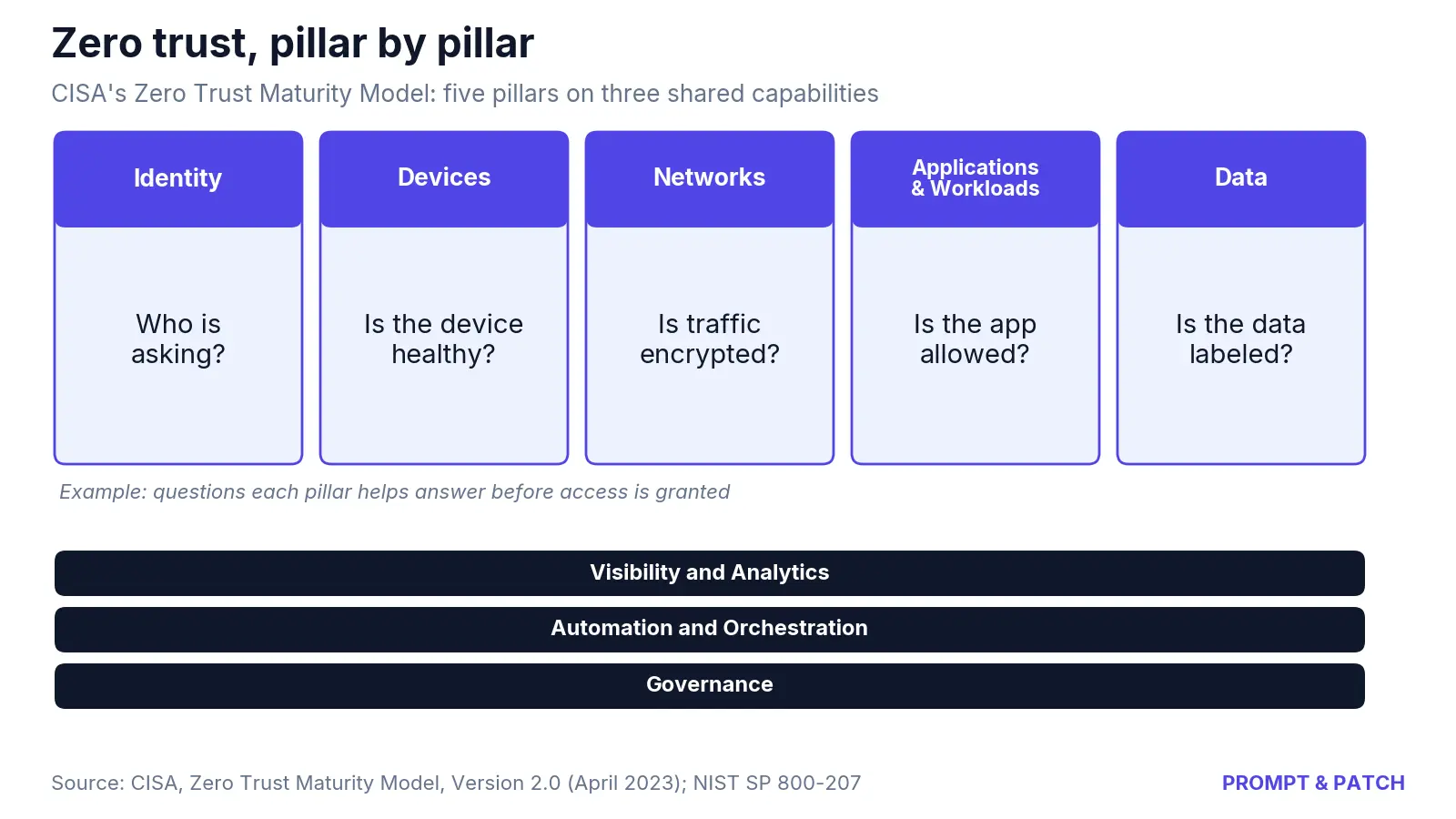
CISA’s model has five pillars: Identity, Devices, Networks, Applications and Workloads, and Data. Three cross-cutting capabilities run under them: Visibility and Analytics, Automation and Orchestration, and Governance. CISA says each pillar can progress at its own pace until cross-pillar coordination is required.
Progress is measured from a Traditional starting point through three stages: Initial, Advanced and Optimal. CISA’s guiding criteria for each:
| Stage | What it looks like, according to CISA |
|---|---|
| Traditional | Manually configured lifecycles and attribute assignments, static policies, one pillar at a time, least privilege set only at provisioning, manual response |
| Initial | Automation of attributes and policy decisions begins, first cross-pillar solutions, some least-privilege changes after provisioning |
| Advanced | Automated controls where applicable, centralized visibility and identity control, enforcement integrated across pillars, least privilege adjusted to risk |
| Optimal | Fully automated, just-in-time access, dynamic policies triggered by observed activity, continuous monitoring across pillars |
Authentication in the Identity pillar shows the progression. At the Traditional stage, an organization uses passwords or MFA with static access. At Advanced, it begins authenticating all identities with phishing-resistant MFA. At Optimal, it “continuously validates identity with phishing-resistant MFA, not just when access is initially granted.” Our guides to MFA methods and passkeys vs. passwords explain the options.
The model was written for federal civilian agencies under Executive Order 14028, but CISA says “all organizations should review and consider adoption” of its approaches.
Common misconceptions
“Zero trust is a product you buy.” NIST’s tenets are written to be technology agnostic, and CISA calls its own model “one of many paths.” Vendors sell components; the architecture is a plan.
“It means getting rid of the firewall.” NIST notes that most zero trust definitions still relate to perimeters in some way, through smaller boundaries such as micro-segmentation or microperimeters.
“It is a one-time project.” CISA calls the path “an incremental process that may take years to implement” and says it will often add costs at first. NIST expects zero trust and older setups to coexist, possibly indefinitely.
How organizations move toward zero trust
Section 7 of NIST’s paper lays out a sequence for organizations with an existing network:
- Identify actors. List users and non-person accounts, such as service accounts. Give extra scrutiny to administrators and developers, who often have blanket access.
- Identify assets. Inventory laptops, phones, IoT devices, accounts, apps and certificates, including unmanaged “shadow IT.”
- Rank business processes by risk. NIST suggests starting with a low-risk process. Workflows that use cloud services or serve remote workers are often good candidates.
- Write policies for that candidate. Map what it depends on upstream (identity systems, databases) and downstream (logging, monitoring).
- Evaluate candidate solutions against questions NIST lists: client software, on-premises support, logging and protocol coverage.
- Deploy in observation mode first. NIST suggests running “reporting-only” for a time, enforcing basic rules such as denying requests that fail MFA, to learn normal behavior before tightening.
- Expand to the next workflow and repeat.
For reference designs, NIST’s National Cybersecurity Center of Excellence released SP 1800-35, Implementing a Zero Trust Architecture, on June 10, 2025. It documents 19 sample implementations built with 24 vendors.
Worked example: choosing a first workflow
Illustration: a 120-person company is choosing its first pilot. Email is used by all 120 employees. A purchasing system is used by 15. NIST says an app used by a subset of staff, such as purchasing, may be preferred over one everyone depends on, such as email.
- Purchasing pilot: 15 ÷ 120 = 12.5% of staff affected if a policy blocks legitimate work.
- Email pilot: 120 ÷ 120 = 100% of staff affected.
Starting with purchasing exposes one-eighth as many people to early mistakes while the team tunes its rules. For a look at how intruders exploit flat, trusted networks, see how ransomware attacks work.
What to do now
- Inventory first: users, service accounts, devices and apps, including shadow IT. NIST treats this as the foundation for everything else.
- Turn on MFA wherever it is available, and plan phishing-resistant MFA for administrators and remote access.
- Remove standing admin rights that are not needed day to day.
- Stop trusting network location: require the same sign-in checks for sensitive apps on the office network as off it.
- Check device health before granting access to sensitive apps, including patch level and whether the device is managed.
- Score each pillar against CISA’s maturity stages, and pick one low-risk workflow as a pilot.
- Put NIST’s solution questions to vendors before you sign.