What Is Agentic AI? How AI Agents Work and How to Control Them
AI agents are language models that use tools in a loop to finish multi-step tasks. How they work, how companies use them, and the controls that limit risk.
Key Takeaways
- Anthropic defines agents as systems where language models “dynamically direct their own processes and tool usage,” while workflows follow predefined code paths.
- OpenAI’s agent guide advises rating every tool low, medium or high risk and requiring human oversight for actions such as large refunds, canceled orders or payments.
- NIST’s Generative AI Profile lists 12 risks, including confabulation and prompt injection, and its AI RMF calls for ways to supersede, disengage or deactivate AI systems that misbehave.
In this article
Agentic AI is software in which a large language model (LLM) does more than answer a question: it chooses tools, takes actions, checks the results and keeps going until a task is done. Anthropic defines agents as systems where LLMs “dynamically direct their own processes and tool usage,” and OpenAI’s guide to building agents calls them “systems that independently accomplish tasks on your behalf.”
That independence makes agents useful and riskier than a chatbot: a wrong chatbot gives a bad answer, while a wrong agent can send the email or issue the refund.
How does an AI agent work?
OpenAI’s “A practical guide to building agents” splits an agent into three parts: a model that makes decisions, tools to take action, and instructions that set guidelines and guardrails. Simple chatbots and sentiment classifiers “are not agents,” the guide says.
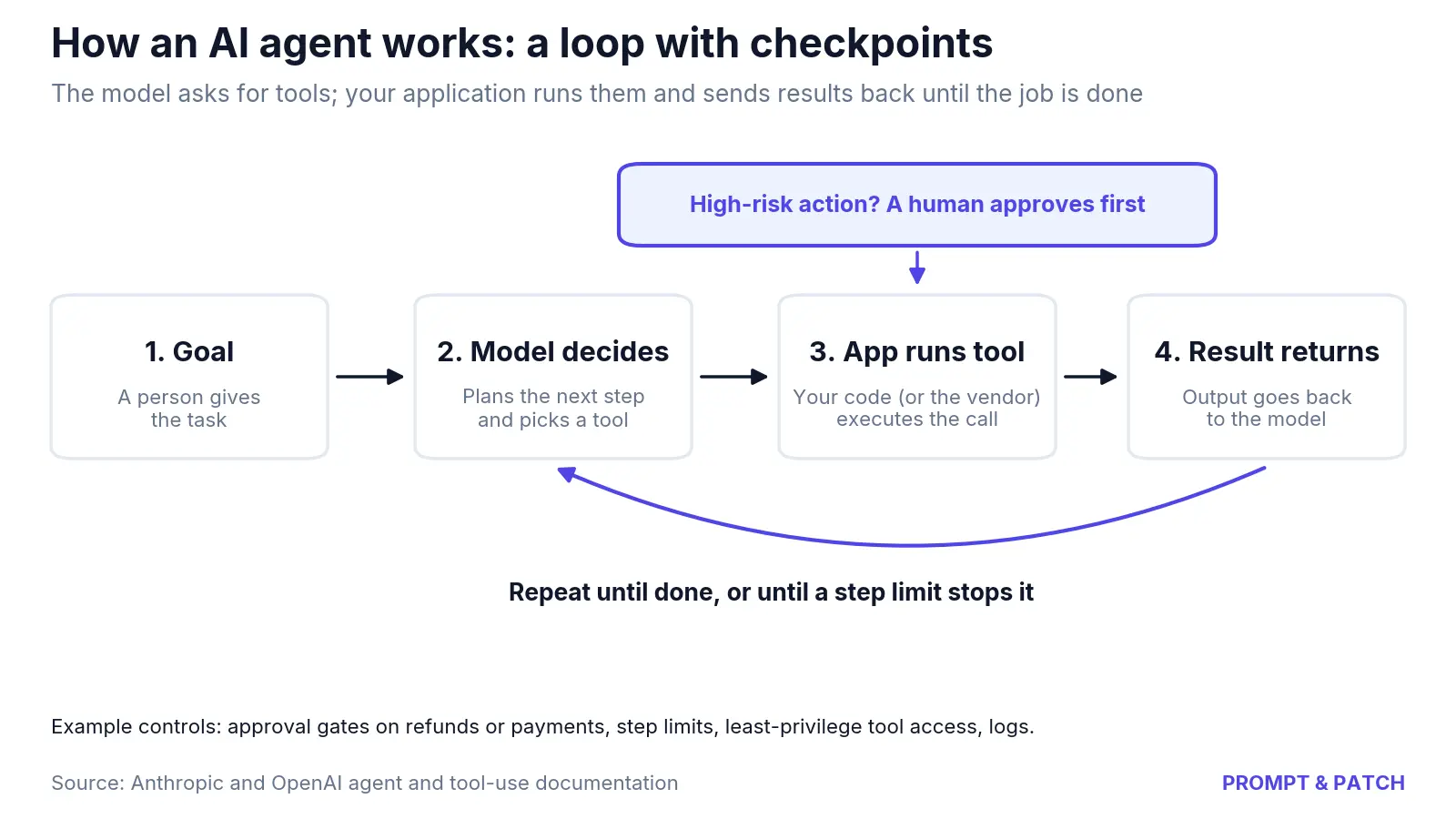
Tools. A tool is a function the model is allowed to request. Claude “determines when to call a tool based on the user’s request and the tool’s description,” Anthropic’s documentation says, and returns a structured call that the developer’s application runs. OpenAI’s API docs describe the same loop in five steps: send a request listing the tools, receive a tool call, run the code, send the result back, then get a final answer or more tool calls. With tools you define, the model never runs anything itself; your code does.
OpenAI groups tools into three types:
- Data tools retrieve information, such as querying a CRM or searching the web.
- Action tools change things, such as sending an email or updating a record.
- Orchestration tools let one agent call another, such as a refund agent.
Planning and the loop. Once a task is clear, Anthropic says, agents “plan and operate independently,” checking “ground truth” from the environment at each step, such as a tool result or code output. In practice they are “typically just LLMs using tools based on environmental feedback in a loop,” with stopping conditions such as a maximum number of iterations.
Anthropic separates agents from workflows, where LLMs and tools follow “predefined code paths.”
Autonomy levels: from suggestions to hands-off
There is no single industry scale for autonomy. NIST’s AI Risk Management Framework says human-AI configurations “can span from fully autonomous to fully manual.” Vendors turn that range into settings. Anthropic’s Claude Code coding agent, for example, has six permission modes that decide what it may do without asking:
| Claude Code mode | What runs without asking (Anthropic docs) | Anthropic’s suggested use |
|---|---|---|
| default (Manual) | Reads only | Reviewing every action, sensitive work |
| acceptEdits | Reads, file edits, common filesystem commands | Iterating on code you’re reviewing |
| plan | Reads, plus classifier-approved commands when auto mode is available | Exploring before changing anything |
| auto | Everything, with background safety checks | Long tasks, reducing prompt fatigue |
| dontAsk | Reads and pre-approved tools; anything else is denied | Locked-down CI and scripts |
| bypassPermissions | Everything | Isolated containers and VMs only |
In auto mode, according to Anthropic, “a second model, the classifier, reviews actions instead of you.” Deny rules block actions in every mode, the docs add. OpenAI’s Agents SDK works at the tool level: a developer can mark a tool needs_approval, which pauses the run until a person approves or rejects the call.
How businesses use AI agents
Google Cloud sorts the deployments it sees into six groups: customer, employee, creative, data, code and security agents. Anthropic says its customer work revealed two “particularly promising applications”:
- Customer support, where tools pull customer data and order history, and actions such as refunds or ticket updates “can be handled programmatically.”
- Coding, where automated tests can check the work, though Anthropic adds that “human review remains crucial.”
OpenAI’s guide points to work that resisted older automation, such as refund approvals and vendor security reviews.
What it means for your team: a worked example
Anthropic warns that agents’ autonomy brings “higher costs, and the potential for compounding errors.” Each tool round trip is another request to the model, which adds to the bill (see how AI API pricing works).
Compounding errors are easy to show with an illustration. Suppose an agent gets each step right 95% of the time and the steps are independent. The chance of a fully correct run drops as tasks get longer:
- 5 steps: 0.95^5 = 77.4%
- 10 steps: 0.95^10 = 59.9%
- 20 steps: 0.95^20 = 35.8%
These are illustrative numbers, not measured rates for any product.
OpenAI’s guide offers a way to place those checkpoints: rate each tool low, medium or high risk based on read-only versus write access, reversibility, account permissions and financial impact. For an example support agent:
| Example tool | Access | Example rating | Example control |
|---|---|---|---|
| Search help-center articles | Read-only | Low | Runs freely, logged |
| Update a support ticket | Write, reversible | Medium | Automated checks |
| Issue a refund | Write, financial | High | Human approval |
The guide names two triggers for handing control to a person: exceeding failure thresholds, such as repeated retries, and high-risk actions such as “canceling user orders, authorizing large refunds, or making payments.”
The main risks, in NIST’s terms
NIST’s AI RMF 1.0, released Jan. 26, 2023, and now being revised, organizes AI risk work into four functions: Govern, Map, Measure and Manage. Its Generative AI Profile (NIST AI 600-1, July 26, 2024) lists 12 risks. Three bear directly on agents:
- Confabulation, NIST’s term for “confidently stated but erroneous or false content.” In an agent, a wrong fact can become a wrong action.
- Information security, including prompt injection. In the indirect form, NIST says, attackers plant prompts “into data likely to be retrieved.” Anthropic’s computer-use docs warn that instructions on webpages or in images “might override your instructions.”
- Human-AI configuration, including automation bias, which NIST describes as “excessive deference to automated systems.”
The framework also calls for mechanisms “to supersede, disengage, or deactivate AI systems” that stray from their intended use (MANAGE 2.4) and for documented human oversight processes (MAP 3.5).
Controls to ask a vendor or your developers about
- Least privilege. For computer-use agents, Anthropic suggests a dedicated virtual machine or container “with minimal privileges,” no access to login credentials and an allowlist of internet domains.
- Approval gates on irreversible or financial actions, like the
needs_approvalsetting in OpenAI’s SDK. - Guardrails on both ends. In OpenAI’s Agents SDK, input guardrails check the user’s request and output guardrails check the final answer.
- Stopping conditions, such as a cap on steps or retries.
- Visible plans and logs. Anthropic lists “explicitly showing the agent’s planning steps” as a core design principle.
- A named owner and an off switch, matching NIST’s MANAGE 2.4.
For a broader buying checklist, see how to evaluate an AI tool for business.
Common misconceptions
“Agents are a different kind of model.” In Anthropic’s and OpenAI’s descriptions, agents run on the same LLMs, wrapped in tools, instructions and a loop. Here is how large language models work.
“More autonomy is always better.” Anthropic recommends “finding the simplest solution possible.” Agentic systems “often trade latency and cost for better task performance,” it says, and for many applications one well-built LLM call with retrieval is enough.
“The model carries out the action.” With tools you define, the model only requests a call. Your application decides whether to run it, so that is where approval rules, permissions and logs belong.
Sources
- Anthropic — Building effective AI agents
- Anthropic — Tool use with Claude (Claude Platform Docs)
- Anthropic — Computer use tool, Security considerations (Claude Platform Docs)
- Anthropic — Choose a permission mode (Claude Code Docs)
- OpenAI — A practical guide to building agents (PDF)
- OpenAI — Function calling (OpenAI API docs)
- OpenAI Agents SDK — Human-in-the-loop
- OpenAI Agents SDK — Guardrails
- Google Cloud — What are AI agents? Definition, examples, and types
- NIST — AI Risk Management Framework
- NIST — Artificial Intelligence Risk Management Framework (AI RMF 1.0), NIST AI 100-1
- NIST — Artificial Intelligence Risk Management Framework: Generative Artificial Intelligence Profile, NIST AI 600-1